
Body Care
Building Rust Apps For Cheap Hackable Handheld Console
Jun
There is a special kind of joy in buying a cheap handheld console, discovering it runs Linux, and realizing it is not just a toyit is a tiny computer wearing a gamepad costume. For developers, makers, retro gaming fans, and anyone who has ever whispered “I can probably hack that” at a suspiciously affordable gadget, building Rust apps for a cheap hackable handheld console is an excellent weekend rabbit hole.
The spotlight here is on devices like the R36S, a budget retro handheld commonly built around the Rockchip RK3326 chipset and often shipped with ArkOS, a Linux-based operating system designed for emulation. It is inexpensive, pocketable, button-rich, and surprisingly capable. More importantly, it exposes enough of the underlying Linux environment that you can write native applications for it instead of treating it like a sealed black box. That means Rust, Cargo, SSH, terminal apps, gamepad input, and a lot of delightful trial and error.
Rust may sound like overkill for a bargain-bin gaming handheld, but that is exactly what makes the project fun. You get a modern systems programming language with memory safety, strong tooling, and high performance, squeezed into a device that costs less than a fancy keyboard switch set. It is like putting a racing helmet on a shopping cartridiculous, educational, and weirdly effective.
Why Cheap Linux Handhelds Are Suddenly Developer Toys
For years, handheld gaming hardware fell into two camps: locked-down commercial systems and hobbyist boards that required you to design half the device yourself. Budget retro handhelds changed that equation. Devices such as the R36S, RG351-style systems, and other RK3326-based consoles often provide a ready-made screen, battery, buttons, speakers, analog sticks, microSD storage, and a working Linux distribution. That is a lot of hardware for a very small price.
The R36S is especially interesting because it was designed for retro emulation but behaves like a small Linux computer once you peek behind the menu. ArkOS, commonly associated with these devices, is based on Ubuntu and supports emulators, ports, and system customization. In practical terms, that means a developer can often connect over SSH, inspect the file system, copy over a binary, and run it directly on the device.
This changes the development story completely. Instead of soldering a display, wiring buttons, configuring a bootloader, and praying to the USB gods, you can start by writing a normal Rust program on your desktop. The handheld becomes the test target. The result is a friendly middle ground between embedded programming and desktop Linux development.
Why Use Rust For A Hackable Handheld Console?
Rust fits this kind of project because it sits in the sweet spot between low-level control and high-level comfort. It produces native binaries, has no required garbage collector, and can run efficiently on modest hardware. At the same time, Rust’s ownership model helps prevent many common memory bugs that would otherwise turn your handheld app into a tiny crash festival.
For a cheap hackable handheld console, Rust brings several advantages:
- Performance: Rust compiles to fast native code, which matters on low-power ARM chips.
- Reliability: The compiler catches many mistakes before they reach the device.
- Tooling: Cargo makes dependency management, builds, profiles, and releases much easier.
- Portability: You can build and test logic on a desktop before deploying to the handheld.
- Community crates: Libraries such as Ratatui, SDL2 bindings, evdev, minifb, pixels, and winit make experiments faster.
Of course, Rust is not magic. It will not automatically make a 20-dollar console behave like a Steam Deck. If your code wastes memory, blocks input, redraws too much, or pulls in huge dependencies, the device will politely remind you that it is still a cheap handheld. Rust gives you better tools, not a license to be careless.
Understanding The Hardware: Small, Cheap, And Surprisingly Capable
A typical R36S-style handheld uses a quad-core ARM Cortex-A35 processor through the RK3326 chipset, usually paired with around 1 GB of RAM and a 3.5-inch 640 x 480 IPS display. That may sound modest compared with modern phones, but for terminal apps, menu tools, pixel games, dashboards, emulation helpers, and simple utilities, it is plenty.
The device’s biggest advantage is not raw horsepower. It is the package. You already have a screen, directional controls, face buttons, shoulder buttons, analog sticks, storage, audio, and power management in a portable shell. If you tried to assemble the same thing from scratch, your desk would quickly look like a spaghetti convention hosted by microcontrollers.
The Linux Advantage
Because these handhelds run Linux-based firmware, development feels familiar. You can often use standard concepts such as file permissions, shell scripts, SSH, system paths, and Linux input devices. Buttons and sticks may appear through the Linux input subsystem, which exposes hardware events to user space. That opens the door to Rust programs that read gamepad input, draw to the terminal, launch tools, or build simple native games.
The Catch: Clones And Firmware Variations
Cheap handhelds are famous for one charming complication: clones. Two consoles sold under the same name may use different screens, slightly different boards, or different firmware images. That means a guide that works perfectly for one unit may require small adjustments on another. Before developing seriously, back up the original microSD card, check your firmware version, and keep notes about your exact hardware revision.
Setting Up A Rust Development Workflow
The basic workflow for building Rust apps for a cheap hackable handheld console is simple in theory: write the code on your main computer, cross-compile it for the handheld’s Linux target, copy the binary to the device, and run it. In practice, the first successful build may involve some wrestling with target triples, linkers, and libraries. This is normal. Cross-compilation is where computers reveal their inner goblin.
Step 1: Confirm The Target Architecture
Before compiling anything, confirm what architecture and userland your handheld uses. Many RK3326 handhelds use ARM 64-bit hardware, but the operating system may provide a 32-bit or mixed user space depending on the firmware. From the device shell, commands such as uname -m, file /bin/bash, and ldd --version can help identify the architecture and C library expectations.
Step 2: Add The Right Rust Target
Rust uses target triples to describe build destinations. Depending on your device, you may need a target such as aarch64-unknown-linux-gnu or an ARMv7 Linux target. The usual pattern is:
That command only covers the Rust side. If your project depends on native C libraries, such as SDL2, you may also need a matching cross-linker and development libraries. For pure Rust terminal apps, the path is often easier.
Step 3: Start With A Tiny App
Do not begin by porting a full 2D engine, asset loader, physics system, and dramatic menu transition with particles. Start with “hello, handheld.” A simple Rust binary that prints system information or displays button states is perfect. Once you can build, copy, and run that binary reliably, everything else becomes less mysterious.
Building Terminal Apps With Ratatui
One of the smartest first projects is a terminal user interface, or TUI. A TUI is light, fast, and friendly to small screens. Ratatui, a Rust library for building terminal interfaces, is a strong fit for dashboards, launchers, settings panels, file tools, input testers, or simple productivity apps.
On a handheld console, a TUI can feel surprisingly natural. The screen is small, the controls are button-based, and the user does not expect a full desktop interface. You can create panels, lists, gauges, logs, and status views without dragging in a heavy graphical stack.
Good TUI App Ideas
- A button and joystick tester for diagnosing hardware input.
- A save-file backup utility that copies game saves to another folder.
- A battery and temperature monitor.
- A simple ROM organizer for legally owned game files.
- A Wi-Fi setup helper for devices using USB network adapters.
- A lightweight launcher for your own homebrew apps.
The beauty of Ratatui is that you can develop much of the interface on your desktop terminal first. Once the layout works, deploy it to the handheld and adjust for the smaller display. The first time your custom menu appears on a pocket console, you may feel the same joy as a wizard discovering a new spell, except the spell is mostly ANSI escape codes.
Reading Buttons And Joysticks In Rust
The most handheld-specific part of the project is input. Linux exposes input devices through files commonly found under /dev/input/. The evdev interface provides events for buttons, axes, and other controls. In Rust, crates such as evdev can help read those events without manually parsing every byte yourself.
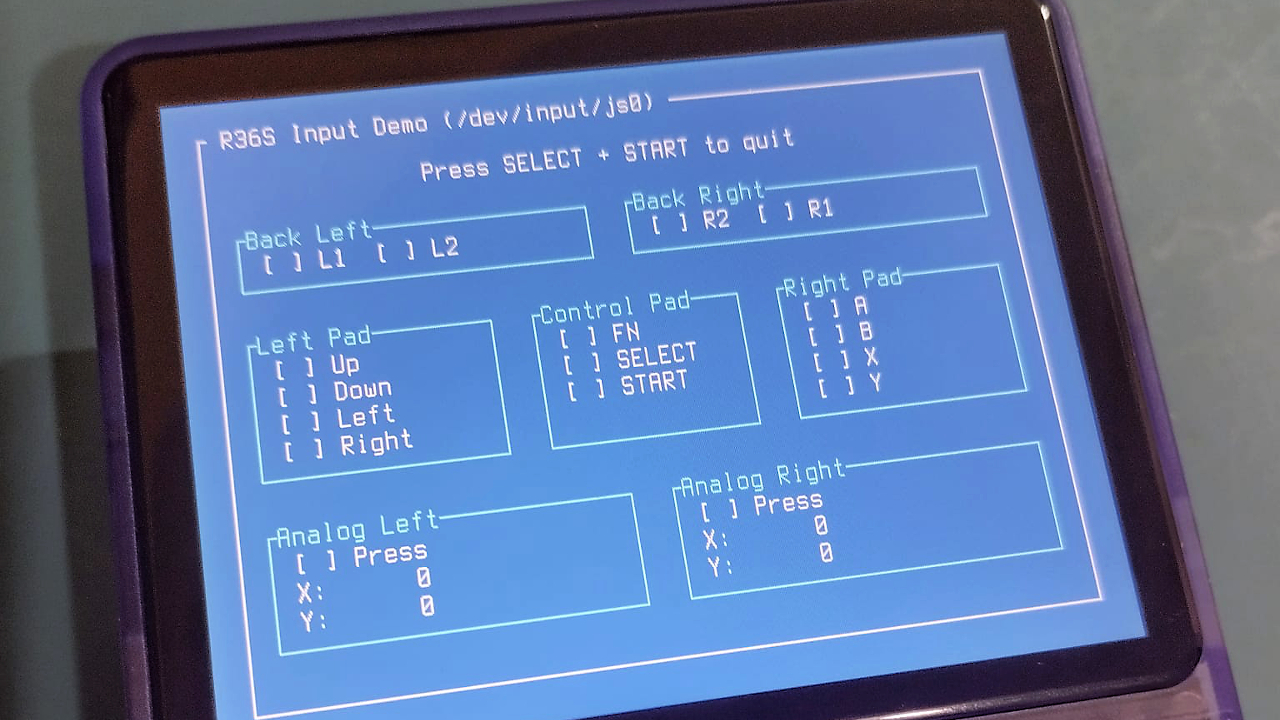
A practical input tester can scan available event devices, detect which ones produce button presses, and print the current state to the screen. That may not sound glamorous, but it is the foundation for everything from games to launchers. Before you can make the hero jump, you need to know which button the console thinks “jump” is.
Input Mapping Tips
- Do not assume every clone maps buttons identically.
- Create a configuration file so users can remap controls.
- Debounce inputs where needed, especially for menus.
- Separate raw input from game actions such as “confirm,” “back,” and “pause.”
- Log unknown events during development; they are clues, not annoyances.
Building Simple Games In Rust
After terminal apps, the next obvious step is building a simple game. For Linux-based handhelds, you have several choices. SDL2 is a proven option for 2D games and controller input, although it may require native dependencies. Other Rust-friendly approaches include pixel-buffer libraries for simple rendering, or a custom framebuffer-style approach if you want to keep things minimal.
The best first game is not an open-world RPG. It is Pong, Snake, Breakout, a tile-based maze, or a one-screen arcade game. These projects force you to solve the core problems: input, timing, rendering, collision, audio, packaging, and exit behavior. Once those work, you can get fancy.
Keep The Game Loop Boring
A reliable game loop is more valuable than a clever one. Read input, update state, render, wait, repeat. Avoid unnecessary allocations inside the loop. Keep assets small. Prefer simple data structures. Measure performance on the handheld, not just your desktop, because your laptop is probably a spaceship compared with the tiny console.
That pseudocode will not win a computer science award, but it will keep your project understandable. Handheld development rewards boring architecture. Boring architecture is how you get to spend Saturday playing your game instead of debugging a mystery freeze at 2:00 a.m.
Cross-Compiling Without Losing Your Mind
Cross-compiling Rust apps is where many beginners stumble. The Rust compiler can generate code for many targets, but the final link step may need external tools. If your app uses only the Rust standard library and no native dependencies, the process can be smooth. If it depends on SDL2, OpenSSL, or other C libraries, you must make sure those libraries exist for the target environment.
Practical Cross-Compilation Advice
- Start with a pure Rust app before adding native dependencies.
- Use release builds for real testing; debug builds may be too slow or too large.
- Keep a deployment script to copy the binary over SSH.
- Test on the actual device early and often.
- Document your target triple, linker, firmware version, and device model.
Tools such as cross can simplify some Rust cross-compilation workflows by using containerized build environments. However, cheap handheld consoles may still require custom adjustments because their firmware, architecture, and installed libraries vary. Treat every successful build as a recipe worth saving.
Optimizing Rust Apps For Small Handhelds
Rust binaries can be larger than expected, especially when you use many dependencies. On a handheld with microSD storage, size may not be catastrophic, but smaller binaries load faster, copy faster, and feel cleaner. Cargo release profile settings can help.
These settings are commonly used to reduce binary size. The trade-off is that builds may take longer, and some settings may affect debugging. For development, keep normal debug builds. For deployment, use a tuned release profile.
Performance Rules That Actually Matter
- Avoid expensive redraws when only a small part of the screen changes.
- Reuse buffers instead of allocating repeatedly.
- Use integer math where floating-point performance is weak.
- Limit background work while reading input.
- Prefer simple file formats for settings and assets.
- Profile on hardware, because guesses are just bugs wearing sunglasses.
On extremely constrained microcontroller projects, such as tiny Rust-powered handheld experiments built around chips like the CH32V003, developers often avoid floating-point math and framebuffers because RAM is measured in kilobytes, not megabytes. The R36S is much more comfortable than that, but the lesson still applies: simple choices scale down better.
Packaging And Installing Your App
Once your binary runs, you need a civilized way to launch it. The simplest method is to copy it to a folder and run it over SSH. The next step is adding a shell script. For a more polished experience, you can integrate it into the handheld’s ports or tools menu, depending on the firmware.
Make sure your app exits cleanly and returns the user to the launcher. Nothing ruins the homebrew magic faster than a program that traps the user in a black screen like a budget escape room.
Deployment Checklist
- Build in release mode.
- Copy the binary and assets to a dedicated folder.
- Set executable permissions with
chmod +x. - Test launch from SSH first.
- Test launch from the handheld menu.
- Confirm the app exits safely.
- Back up configuration files before experimenting.
Specific Project Ideas For Rust On A Cheap Handheld
A hackable handheld console is more than a retro game box. It is a tiny field computer with buttons. Rust makes it practical to build tools that are fast, reliable, and easy to distribute as single binaries.
1. Input Diagnostic Tool
This is the ideal first project. Display each button, trigger, and joystick axis on the screen. When the user presses a button, highlight it. This teaches Linux input handling and helps diagnose clone hardware differences.
2. Save Backup Manager
Build a TUI that finds save folders, creates timestamped backups, and restores previous versions. Add warnings before overwriting files. This is practical, lightweight, and genuinely useful.
3. Minimal Game Launcher
Create a launcher for your own Rust homebrew apps. Use a simple JSON or TOML config file with app names, paths, and icons or text labels. Keep it fast and readable.
4. Pixel Art Sketchpad
Use the D-pad to move a cursor, buttons to draw and erase, and save images to a small file format. It is silly, fun, and a great way to learn input plus rendering.
5. Pocket Pomodoro Timer
Turn the handheld into a productivity timer. Add retro sound effects, a big countdown, and session logs. Congratulations: your gaming device now tells you to stop procrastinating. The irony is delicious.
Common Problems And How To Avoid Them
“The Binary Will Not Run”
This usually means the target architecture, linker, or C library does not match the device. Run file your-binary on the binary and compare it with known working executables on the handheld.
“It Works Over SSH But Not From The Menu”
The app may depend on a working directory, environment variable, terminal setting, or permission that differs when launched from the frontend. Use absolute paths, log errors to a file, and keep launch scripts simple.
“Input Is Weird”
Welcome to handheld development. Different devices may expose different event files or codes. Build a detection screen and allow remapping. Never hard-code your way into sadness.
“The App Is Too Slow”
Build in release mode, reduce redraws, remove unnecessary logging, avoid heavy dependencies, and measure where time is going. If you are making a game, check whether rendering, input polling, file I/O, or update logic is the real bottleneck.
Development Experience: What Building Rust Apps On A Cheap Handheld Feels Like
Building Rust apps for a cheap hackable handheld console feels like discovering a secret developer mode in a toy you bought for fun. At first, the device looks like a simple retro gaming machine. Then you connect over SSH, browse the file system, and realize the little thing has opinions, directories, permissions, logs, and all the other charming furniture of Linux. Suddenly, it is not just a console. It is a pocket-sized lab.
The most satisfying part is the fast feedback loop once everything is configured. You edit code on your main computer, run Cargo, copy the binary to the device, launch it, press buttons, watch it fail in a new and educational way, and repeat. Every loop teaches something. One build teaches you about target triples. Another teaches you about executable permissions. Another teaches you that your beautiful UI does not fit on a 3.5-inch screen unless the user owns a microscope.
The screen size changes how you design software. Desktop developers love sidebars, panels, logs, nested menus, and settings screens that look like aircraft dashboards. On a handheld, that becomes visual soup. Good handheld apps need fewer words, bigger states, clear selection indicators, and forgiving navigation. A “Back” action should always exist. A “Quit” action should be obvious. If the app requires a keyboard, it may already be the wrong app for the device.
Input also forces humility. On a normal computer, you have a keyboard, mouse, clipboard, and terminal history. On a handheld, you have buttons. Buttons are wonderful, but they are not patient. If your app asks the user to type a long path, the app is the problem. Better design means scanning folders automatically, offering lists, remembering recent choices, and using simple confirmation screens.
Rust’s compiler becomes a surprisingly good companion in this environment. When deployment is slightly annoying, compile-time confidence matters. You do not want to copy a binary to the handheld just to discover a careless lifetime issue, missing match case, or accidental type mismatch. Rust catches a lot before the device ever gets involved. That does not eliminate bugs, but it moves many of them closer to your editor, where coffee is nearby and the screen is not tiny.
The biggest mental shift is learning to respect constraints without being afraid of them. Cheap handhelds are limited, but limits create better projects. A simple input tester can be more valuable than an ambitious game engine that never runs smoothly. A small save manager can be more useful than a half-finished graphical shell. A clean TUI can feel more polished than a heavy interface that struggles to draw.
There is also a community flavor to this kind of work. Many handheld owners are tinkerers. They flash firmware, compare screens, repair buttons, swap microSD cards, and share scripts. Releasing a Rust app for these devices means thinking like a good guest: include clear instructions, avoid risky assumptions, do not overwrite user files without confirmation, and explain which firmware and model you tested.
The reward is wonderfully tangible. Your code is no longer just a terminal window on a laptop. It is in your hands. It responds to real buttons. It runs on a cheap console that was never marketed as a Rust development kit. That makes even a basic menu feel exciting. The project may start as a joke“Can I run Rust on this thing?”but it often ends as a deeper lesson in Linux, cross-compilation, UI design, performance, and hardware variation.
In other words, building Rust apps for cheap hackable handheld consoles is not just about making software. It is about reclaiming curiosity. Modern devices often hide their internals behind polished glass and locked ecosystems. These little handhelds, imperfect as they are, still leave enough doors open for developers to wander in, trip over a config file, and build something delightful.
Conclusion
Building Rust apps for a cheap hackable handheld console is one of the most approachable ways to explore native Linux development on real portable hardware. Devices like the R36S provide the essentials: a screen, controls, battery, storage, and a Linux-based operating system. Rust adds performance, safety, and excellent tooling. Together, they create a playground where terminal apps, utilities, launchers, and simple games are all within reach.
The best way to begin is modestly. Build a hello-world binary. Then build an input tester. Then try a Ratatui dashboard. After that, experiment with a simple game loop. Keep notes, back up your microSD card, test on real hardware, and design for the small screen instead of fighting it.
Cheap handheld consoles may not replace professional development boards or modern gaming systems, but they offer something rare: a low-cost, portable, hackable environment that makes programming feel playful again. And honestly, any device that lets you learn Rust while holding it like a Game Boy deserves a little applause.
Note: This article is written for web publication and synthesizes real-world information from current Rust documentation, embedded Rust practices, Linux handheld development guides, and community research around R36S-style hackable consoles.

