
Body Care
8 Ways to Increase Your Driving Comfort
Aug
Driving should not feel like a wrestling match between your lower back, your steering wheel, and a seat designed by someone who has apparently never owned a spine. Yet many drivers accept stiff shoulders, numb legs, sweaty clothes, poor visibility, and an irritatingly bumpy ride as unavoidable parts of being behind the wheel.
The good news is that improving driving comfort does not always require buying a luxury vehicle with seats that massage you while politely remembering your favorite temperature. Small adjustments to your driving position, cabin environment, vehicle maintenance, and travel routine can make everyday commutes and long road trips noticeably more pleasant.
Comfort is also closely connected to control. When you can reach the pedals naturally, see clearly, breathe comfortably, and stay alert, you are less likely to become distracted by pain or fatigue. The following eight strategies can help you create a calmer, more supportive, and more enjoyable driving experience.
Driving Comfort at a Glance
- Adjust your seat for natural movement and support.
- Improve lumbar, hip, and neck support.
- Position the steering wheel, mirrors, and controls correctly.
- Manage temperature, airflow, and cabin air quality.
- Maintain tires, alignment, and suspension components.
- Reduce cabin noise, vibration, clutter, and distractions.
- Take planned breaks and support your body during long drives.
- Use route planning and driver-assistance technology wisely.
1. Adjust Your Seat for a Natural Driving Position
The quickest way to increase driving comfort is to stop treating the seat controls like mysterious buttons reserved for dealership employees. Your seat position affects your back, hips, knees, shoulders, visibility, and ability to respond quickly.
Begin with the distance from the pedals
Move the seat forward until you can fully press the brake pedal without lifting your hips or stretching your leg straight. Your knee should remain slightly bent when the pedal is fully depressed. Sitting too far away encourages you to reach with your toes, which can create tension through the ankle, thigh, and hip. Sitting too close can crowd your legs and reduce comfortable movement.
Set the seat height and cushion angle
Raise the seat until you have a clear view of the road and dashboard without placing your head uncomfortably close to the roof. Your hips should ideally be level with or slightly higher than your knees. If the front of the seat cushion presses into the backs of your thighs, reduce the cushion angle or lower the front edge if your vehicle allows it.
Keep the backrest supportive rather than horizontal
A deeply reclined seat may look relaxed, but it often forces the driver to push the head and shoulders forward to reach the wheel. Use a mostly upright position that supports your entire back while allowing your shoulders to remain against the seat. Your seat belt should rest across the middle of your shoulder and low across your hips, not against your neck or abdomen.
2. Improve Lumbar, Hip, and Neck Support
Even a carefully adjusted seat may not match the shape of your body. Car seats are designed to accommodate a wide range of drivers, which sometimes means they fit everyone reasonably well and nobody perfectly.
Support the natural curve of your lower back
Adjust the built-in lumbar support until it fills the space around your belt line without creating a hard pressure point. More support is not automatically better. If the lumbar section feels like a small animal is trying to escape through your spine, reduce it.
Vehicles without adjustable lumbar support can often be improved with a small lumbar cushion or a firmly rolled towel. Place it in the curve of the lower back rather than underneath the shoulder blades. Test the support during an ordinary drive before taking it on a six-hour road trip.
Choose cushions carefully
A supportive seat cushion may reduce pressure around the hips and tailbone, especially when the original seat foam has softened with age. However, an excessively thick cushion can raise you too close to the roof, change the seat-belt position, or reduce thigh support.
Avoid loose cushions that slide during braking or cornering. Any accessory added to the driver’s seat should remain stable and should not interfere with seat-mounted airbags, seat controls, or the proper fit of the seat belt.
Position the head restraint correctly
The head restraint is a safety component, not a pillow designed for napping at traffic lights. Adjust it so the top is approximately level with the top of your head and the center aligns with the back of your head. It should be close enough to provide support without pushing your head sharply forward.
Research on prolonged driving indicates that seat design, lumbar support, posture, vibration, and road conditions can all influence perceived discomfort. A comfortable setup is therefore personal and may require several small adjustments rather than one dramatic change.
3. Position the Steering Wheel, Mirrors, and Controls
A driver who must lean forward every time the road curves will eventually develop shoulders with the emotional stability of an overworked rubber band. The steering wheel should come to you; you should not have to chase it.
Bring the wheel within comfortable reach
Use the tilt and telescoping adjustments while the vehicle is parked. With your shoulders resting against the seat, you should be able to hold the wheel with slightly bent elbows. Your wrists should reach the upper portion of the wheel without pulling your shoulders away from the backrest.
Avoid setting the wheel so low that it contacts your thighs or so high that it blocks the instrument panel. Maintain appropriate space between your chest and the steering-wheel airbag according to your owner’s manual.
Adjust mirrors after adjusting the seat
Set the rearview and side mirrors only after your final seating position is established. You should be able to check each mirror with small movements of the eyes and head rather than twisting your torso.
Proper mirror placement reduces repeated neck movement and helps limit blind spots. Clean the mirrors, windshield, interior glass, and backup camera regularly. A beautifully adjusted mirror covered in fingerprints is merely a decorative rectangle.
Make frequently used controls easy to operate
Learn the location of climate, wiper, lighting, and audio controls before beginning a trip. Set navigation, music, and temperature while parked whenever possible. Voice controls and steering-wheel buttons can reduce reaching, but they should be familiar enough that using them does not become a separate concentration exercise.
4. Manage Temperature, Airflow, and Cabin Air Quality
A supportive seat cannot save a drive when the cabin feels like a greenhouse, walk-in freezer, or enclosed storage unit for mysterious odors. Thermal comfort has a major effect on how relaxed and attentive you feel.
Precondition the cabin
On extremely hot or cold days, allow the climate-control system to begin working before you settle into a long trip. When parked safely, opening the doors or windows briefly can help release trapped heat. Some modern vehicles also offer scheduled preconditioning through a key fob or mobile application.
Direct vents strategically
Avoid blasting cold air directly into dry eyes or stiff hands for hours. Aim vents so air circulates through the cabin rather than striking one part of the body continuously. In winter, use the defroster early enough to maintain visibility instead of waiting until the windshield resembles frosted bathroom glass.
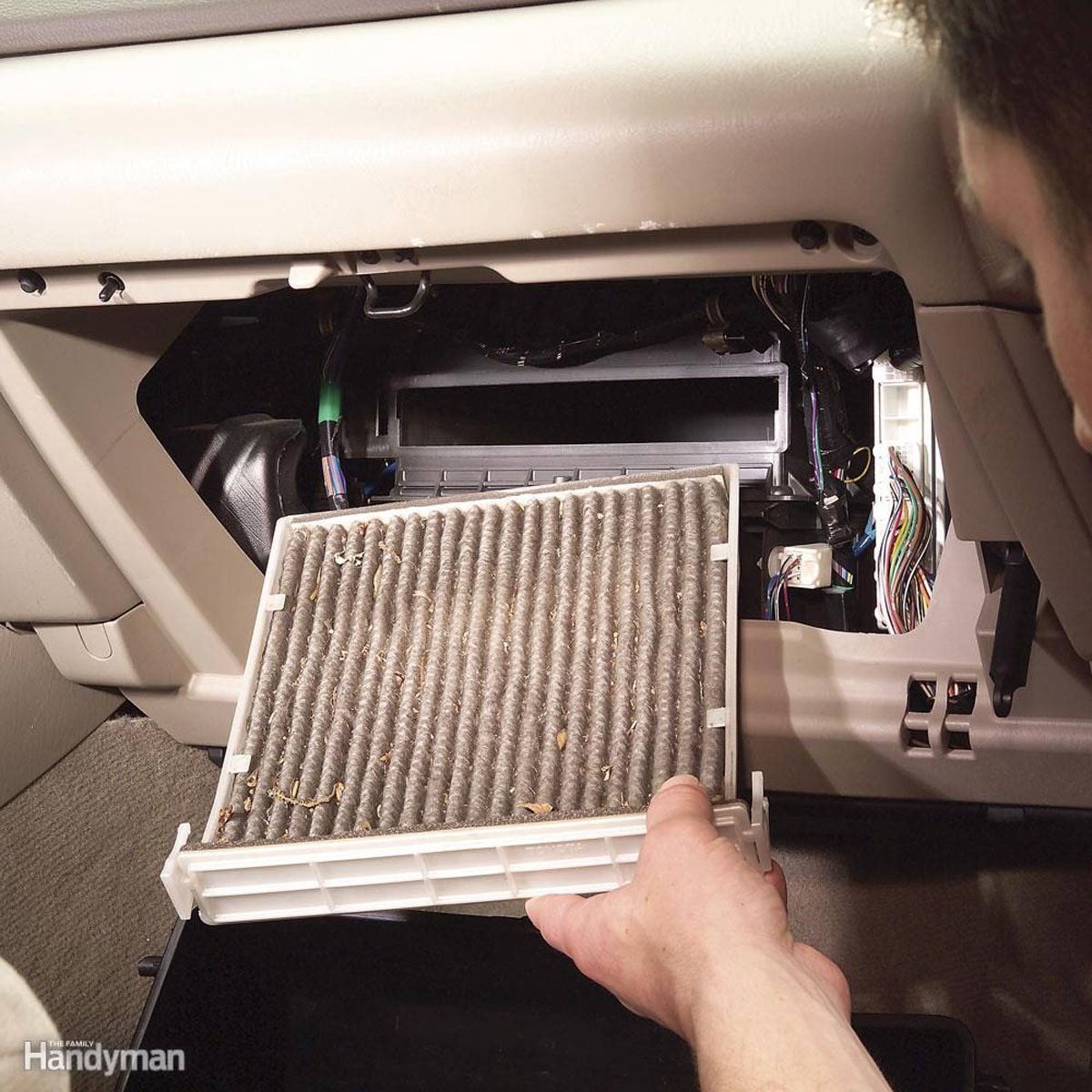
Replace the cabin air filter
A clogged cabin filter may reduce airflow and allow dust or odors to linger. Follow the replacement interval in the vehicle’s maintenance schedule, adjusting it when the car is frequently driven in dusty, smoky, or polluted conditions.
Recirculation mode can reduce the amount of roadway particle pollution entering the cabin in heavy traffic. However, switching periodically to fresh-air mode may make the cabin feel less stale during longer drives. Drivers with allergies or respiratory conditions should discuss specific air-quality concerns with a qualified health professional.
5. Maintain Tires, Alignment, and Suspension Components
Sometimes the uncomfortable object is not the seat. It is the entire car shaking because a tire is underinflated, a wheel is out of balance, or a suspension component has spent the last year quietly requesting retirement.
Use the recommended tire pressure
Check tire pressure when the tires are cold and inflate them to the vehicle manufacturer’s recommended pressure. This information is usually found on the driver-side door placard or in the owner’s manual. Do not automatically use the maximum pressure printed on the tire sidewall.
Incorrect pressure can affect ride quality, handling, tire wear, braking behavior, and fuel efficiency. Overinflation may make impacts feel harsher, while underinflation can make steering feel sluggish and generate excess heat.
Investigate vibration and pulling
A steering-wheel shake, rhythmic thumping, or persistent pull to one side should not be accepted as part of the car’s personality. These symptoms can result from tire damage, incorrect inflation, wheel imbalance, alignment problems, uneven wear, or worn suspension parts.
Inspect shocks, struts, and bushings
Worn suspension components may increase bouncing, body movement, noise, and impact harshness. Have the vehicle inspected when it continues bouncing after bumps, dives excessively during braking, leans unusually in turns, or produces repeated clunks.
When replacing tires, consider ride comfort and road noise along with price, tread life, handling, and weather performance. A tire designed primarily for sharp performance may feel firmer than a touring tire developed for quieter, smoother travel.
6. Reduce Noise, Vibration, Clutter, and Distractions
Comfort is not purely physical. Constant rattles, rolling bottles, tangled charging cables, and a navigation device that keeps falling into the cup holder can turn a calm drive into a mobile irritation laboratory.
Remove loose objects
Store tools, reusable bottles, coins, sports equipment, and cargo so they cannot slide or rattle. Besides creating noise, unsecured items can become dangerous during sudden braking. Use cargo organizers, trunk nets, and closed console compartments where appropriate.
Track down abnormal cabin noise
Inspect worn door seals, loose trim, damaged splash shields, and poorly fitted floor mats. A mechanic should investigate new humming, grinding, knocking, or vibration-related noises, especially when they change with vehicle speed.
Create a calmer sound environment
Music, audiobooks, and podcasts can make routine drives more enjoyable, but excessive volume adds fatigue and may prevent you from hearing horns, sirens, or mechanical warning sounds. Choose audio that keeps you engaged without making you feel as though you are operating a nightclub on wheels.
Mount essential devices properly
Place a phone or navigation screen where it can be viewed briefly without blocking the road, mirrors, airbags, or dashboard warnings. Secure charging cables away from pedals and steering controls. Notifications that are not needed for the trip should be silenced before departure.
7. Take Breaks and Support Your Body on Long Drives
No seating position can make the human body love remaining nearly motionless for an entire day. Static sitting can gradually increase muscular fatigue and discomfort even when the seat initially feels excellent.
Plan breaks before discomfort begins
On long trips, consider stopping about every two hours or roughly every 100 miles, depending on traffic, weather, personal needs, and available rest areas. Walk for a few minutes, gently move your hips and shoulders, and give your eyes a break from fixed-distance focus.
Begin the trip rested
A lumbar cushion cannot compensate for serious sleepiness. Adults should prioritize adequate sleep before driving and avoid beginning a long trip at a time when they would normally be asleep. Warning signs such as frequent yawning, heavy eyelids, drifting within the lane, missing signs, or not remembering the last several miles mean it is time to stop safely.
When drowsiness appears, open windows and loud music are not dependable cures. Find a safe place to stop. Guidance from the CDC’s National Institute for Occupational Safety and Health notes that a short nap, sometimes combined with caffeine, can provide temporary help, but sleep is the only real remedy for fatigue.
Use water, food, and clothing sensibly
Keep water accessible and choose light snacks that do not create a major energy crash. Very heavy meals can leave some drivers feeling sluggish. Wear loose, breathable clothing and shoes that allow secure pedal operation. Bulky coats can restrict shoulder movement and affect seat-belt fit, so warm the cabin and remove unnecessary layers when practical.
8. Plan a Lower-Stress Route and Use Technology Wisely
A comfortable trip begins before the engine starts. The smoothest seat in the world will not feel luxurious when you are late, lost, low on fuel, and discovering that your chosen highway has transformed into a parking lot.
Review the route in advance
Check traffic, construction, weather, fuel or charging stops, parking options, and rest areas before departure. Save essential maps for offline use when traveling through areas with unreliable service.
The fastest route is not always the most comfortable. A slightly longer road with lighter traffic and fewer complex interchanges may reduce stress, harsh braking, and constant lane changes. Build extra time into important journeys so every slow driver does not become the villain in your personal action movie.
Use cruise control selectively
Conventional or adaptive cruise control may reduce repetitive ankle tension on suitable highways. It should not be used when road, weather, traffic, or visibility conditions require frequent speed changes. Remain attentive and keep your feet ready to respond.
Understand driver-assistance features
Lane support, parking sensors, blind-spot monitoring, heated seats, ventilated seats, automatic climate control, and adjustable suspension can improve convenience and comfort. However, assistance systems have operational limits. Review the owner’s manual and avoid assuming the vehicle can manage situations it was not designed to handle.
When shopping for another vehicle, take a meaningful test drive on several road types. Evaluate seat shape, lumbar support, pedal alignment, entry and exit, outward visibility, control layout, suspension behavior, and cabin noise. A seat that feels wonderful for five minutes may begin negotiating with your tailbone after forty-five.
Conclusion: Build Comfort Through Small, Thoughtful Changes
Increasing your driving comfort is rarely about finding one magical accessory. It is about creating a complete environment that supports your posture, reduces unnecessary effort, limits fatigue, and keeps the vehicle operating smoothly.
Start by adjusting the seat, wheel, mirrors, and head restraint while parked. Then address lumbar support, cabin temperature, airflow, tire condition, clutter, and route planning. On longer trips, take breaks before your body begins filing formal complaints.
Persistent pain, numbness, weakness, tingling, dizziness, or difficulty operating the pedals should not be ignored. Seek medical advice when symptoms continue, worsen, or interfere with safe driving. Vehicle modifications should also be assessed carefully to ensure they do not interfere with airbags, seat belts, controls, or visibility.
A better driving experience may be only a few adjustments away. Your car may not become a rolling luxury suite, but your back, shoulders, and mood will probably appreciate the promotion.
Real-World Experiences: What Usually Makes the Biggest Difference
The following composite experiences reflect common situations faced by drivers and are included to illustrate how multiple comfort improvements can work together.
The commuter who blamed the car seat
A daily commuter began experiencing a tight lower back after approximately thirty minutes of driving. The obvious suspect was the aging seat, so the driver bought a thick memory-foam cushion. Unfortunately, the cushion raised the hips too high, reduced thigh support, and placed the seat belt closer to the neck. The drive became softer but not more comfortable.
The more successful solution was less dramatic. The cushion was removed, the seat was moved slightly forward, and the backrest was returned to a more upright angle. A small lumbar roll was placed at belt level. The steering wheel was extended closer so the driver no longer leaned forward. After several days of fine-tuning, shoulder tension and back discomfort became far less noticeable.
The lesson is simple: accessories should correct a specific problem. They should not be used to bury an incorrect seating position under additional foam.
The road trip that improved after slowing down
Another common experience involves travelers who attempt to cover the maximum distance with the minimum number of stops. During the first half of the trip, everyone feels productive. Several hours later, the driver becomes stiff, passengers become restless, and every pothole feels personally insulting.
On the return journey, the same travelers schedule brief stops approximately every two hours. Fuel, meals, stretching, and restroom breaks are combined efficiently. The driver alternates with another qualified adult, and the route includes an extra thirty minutes of flexibility.
Although the return trip takes slightly longer on paper, it feels shorter. Nobody reaches the destination with cramped hips and the social warmth of an angry porcupine. Planned breaks reduce the temptation to continue driving after fatigue has already developed.
The uncomfortable vehicle with a mechanical cause
A driver may spend months adjusting the seat without realizing that much of the discomfort comes from the road through the vehicle. In one typical scenario, the steering wheel develops a mild vibration at highway speeds. Because the car remains drivable, the driver gradually becomes accustomed to it.
A tire inspection eventually reveals uneven wear and incorrect pressure. After correcting the pressure, balancing the wheels, and completing an alignment, the cabin feels calmer. The driver no longer grips the steering wheel as tightly, and the trip requires less physical effort.
This experience demonstrates why comfort complaints should not automatically be treated as interior-design problems. Vibration, pulling, bouncing, and road noise may be signs that the tires, wheels, alignment, or suspension need attention.
The difference created by a five-minute pre-drive routine
One of the most practical habits is a short setup routine before a long journey. The driver removes bulky items from pockets, adjusts the seat and mirrors, sets the temperature, connects the phone, enters the destination, and places water within easy reach. Loose objects are secured, and the first rest stop is identified before departure.
None of these actions is revolutionary. Together, however, they prevent repeated reaching, searching, twisting, and decision-making while the vehicle is moving. The driver begins the trip settled rather than hurried.
This is often the central truth about driving comfort: small irritations accumulate. A slightly poor seat position, warm cabin, loose bottle, noisy tire, and uncertain route may be tolerable individually. Combined over several hours, they can make a routine journey exhausting. Correcting those details one by one creates a surprisingly large improvement without requiring a new car or an expensive collection of gadgets.
Note: Make all seating, mirror, device, navigation, and climate-control adjustments while safely parked. Consult the vehicle owner’s manual before adding cushions, covers, steering-wheel accessories, or other items near airbags and safety systems.

