
Body Care
A Luggable Computer For The Raspberry Pi Era
May
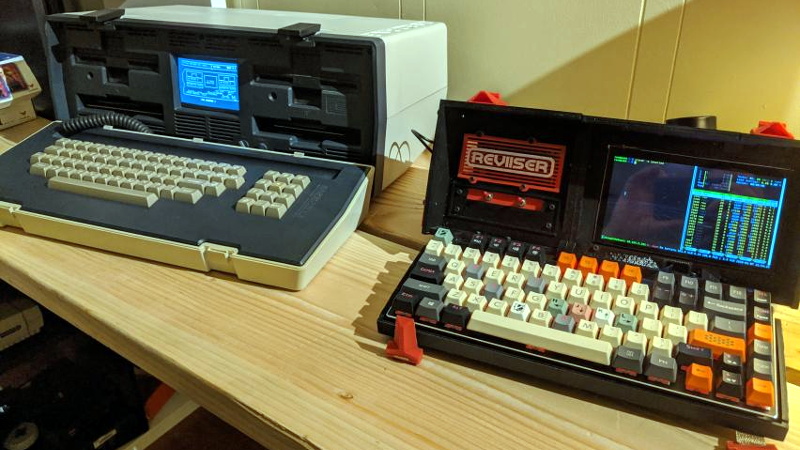
Once upon a time, a “portable computer” was a machine you could technically carry, provided you also had decent posture and a forgiving lower back. Those early luggables looked like someone had stuffed a desktop into a suitcase and called it innovation. And honestly? It was innovation. The surprise is that the idea still makes sense today.
In the Raspberry Pi era, the luggable computer is having a weirdly glorious second life. Not because people suddenly forgot laptops exist, but because makers, tinkerers, students, field technicians, retro-computing fans, and the occasional unapologetic gadget goblin want something different. They want a machine that feels like a project, works like a tool, and looks like it escaped from an alternate 1987 where cyberpunk won.
A modern Raspberry Pi luggable is not trying to beat a MacBook Air at being thin, sleek, or socially acceptable at a coffee shop. Its mission is different. It aims to be hackable, repairable, customizable, and delightfully specific. It can be a field workstation, a retro gaming console, a portable Linux box, a radio rig, a hardware lab, or a one-of-a-kind conversation starter that says, “Yes, I do know what GPIO stands for, and yes, I brought it on purpose.”
What Makes a Luggable a Luggable?
The word luggable comes from an earlier era of computing, when “portable” meant “has a handle.” Machines like the Osborne 1 and the Compaq Portable sat in the awkward middle ground between desktop and laptop. They were larger than notebooks, smaller than full desktop setups, and built for people who needed computing power on the move before battery-powered slim machines became normal.
That middle ground has become interesting again. Today’s laptops are incredible, but they are also closed, polished, and increasingly optimized for consumers who want everything to “just work.” A Raspberry Pi luggable embraces the opposite philosophy. It invites you to open the case, reroute the cables, swap the display, redesign the keyboard, add a battery board, bolt on sensors, and ask the deeply noble question: “What if this computer had a handle and looked like it belonged on a spaceship maintenance cart?”
Why the Raspberry Pi Changed the Equation
The reason modern luggables feel more practical than their ancestors is simple: the Raspberry Pi finally made compact computing cheap, capable, and flexible enough to support the format without turning the build into a heroic act of compromise.
Early Pi projects were charming, but they often required patience, lowered expectations, and the spiritual resilience to watch a browser open like it was emerging from hibernation. Newer boards changed that. Modern Raspberry Pi hardware is fast enough for web browsing, writing, coding, media playback, retro emulation, lightweight productivity, and a surprising amount of tinkering that used to demand a bulkier PC.
That performance jump matters. A luggable only works if it feels useful once you finish admiring it. With newer boards, especially Raspberry Pi 5-class hardware, the idea stops being a novelty and starts becoming a legitimate portable workstation for focused tasks. That is the turning point.
Performance That Finally Feels Grown-Up
The modern Pi sweet spot is not raw horsepower for its own sake. It is “enough computer” in a small, affordable, low-power package. For a luggable, that matters more than benchmark bragging rights. You want a system that boots quickly, launches apps without dramatic pauses, handles Linux smoothly, and does not turn into a tiny griddle the moment Firefox sees five tabs.
That is why current Raspberry Pi builds feel so different from the earliest maker laptops. They are not merely adorable experiments anymore. They are credible machines for real jobs: network diagnostics, SDR workflows, portable development, classroom demos, robotics control, writing, retro gaming, and offline productivity.
Storage Got Better, So the Experience Got Better
One of the least glamorous but most important upgrades in the Raspberry Pi world is storage. The more a luggable feels like a real computer, the more it benefits from faster boot and load times. SSD and NVMe options have pushed Pi builds far beyond the old “microSD and a prayer” era. That means smoother web browsing, faster installs, snappier desktop behavior, and less time staring at a loading spinner that seems emotionally invested in your suffering.
For a portable machine, that improvement is huge. A luggable should feel ready when you open it. Fast storage helps it behave less like a science fair exhibit and more like a dependable tool.
The New Golden Formula: Small Board, Big Personality
Part of the Raspberry Pi appeal is that it does not force one design language. You can build a retro briefcase computer, a rugged field box, a cyberdeck with exposed hardware, a clamshell mini-laptop, or a keyboard-first all-in-one inspired by the Pi 400 philosophy. The board is not the whole identity of the machine. It is the engine that lets the rest of your design ideas become real.
That flexibility is why modern luggables feel culturally interesting, not just technically clever. They sit at the intersection of practical engineering and personal taste. One maker wants a military-radio vibe. Another wants a beige 1980s office machine. Another wants a synth-friendly box full of knobs, mini screens, and enough ports to confuse airport security. The Raspberry Pi says yes to all of them.
Display Choices Shape the Entire Build
The display is where the soul of the luggable lives. Tiny screens create a charming “palmtop” feel, but they can also turn serious work into a squinting contest. Wider displays, unusual aspect ratios, and hinged clamshell layouts feel more usable and more visually distinctive. Many of the most successful Raspberry Pi luggables balance nostalgia with practicality: enough screen to write, code, monitor systems, or browse documentation, but still compact enough to remain delightfully over-engineered rather than absurdly oversized.
That balance is hard to fake. Get it wrong, and you build a cool prop. Get it right, and you build a machine people actually keep using.
Keyboard Quality Is Not Optional
If the keyboard is bad, the luggable is bad. That sounds harsh, but portable computers are typing machines first and art objects second. The best Raspberry Pi luggables understand this. They make space for mechanical boards, compact custom layouts, or at least genuinely usable input. A gorgeous enclosure paired with a terrible keyboard is like building a dream garage and parking a shopping cart in it.
This is also why keyboard-based Pi designs remain appealing. The Pi 400 idea, in particular, proved that baking the computer into the keyboard still makes a lot of sense. It is compact, approachable, and inherently portable. For some makers, the modern luggable is really just that concept taken a few wonderfully unhinged steps further.
What Actually Goes Into a Good Raspberry Pi Luggable?
The parts list varies, but the best builds usually revolve around the same design questions:
- Compute: Which Pi board fits the goal? A Pi 5 for stronger desktop performance, a Pi 4 for balance, a Zero-class board for compact specialty builds.
- Display: Big enough to be useful, small enough to stay portable.
- Input: A keyboard you will not resent after ten minutes.
- Power: Wall power only, internal battery, or swappable pack?
- Storage: microSD for simplicity, SSD or NVMe for a more desktop-like feel.
- Cooling: Passive if possible, active if the workload demands it.
- I/O: USB, Ethernet, audio, radio modules, GPIO access, camera connectors, or whatever else your weird little masterpiece requires.
The smartest builds start with the use case, not the aesthetics. A field diagnostic rig needs rugged access and battery planning. A writing machine needs a better keyboard and a readable screen. A retro build needs charm without becoming a hostage situation for usability. A ham radio or SDR setup needs antenna planning, clean cable runs, and room for accessories. The enclosure should follow the mission.
Who Is a Raspberry Pi Luggable Actually For?
Not everyone. That is part of the fun.
A luggable makes sense for people who want a task-focused computer rather than a general-purpose lifestyle appliance. Field technicians can use one for diagnostics and configuration. Students can learn Linux, electronics, and hardware design on a machine they built themselves. Makers can create demo rigs for robotics, audio, sensors, or computer vision. Retro fans can turn one into a glorious emulation station. Writers and coders can use one as a distraction-light machine with exactly the tools they need and none of the usual digital chaos.
It also makes sense for people who enjoy computing as a physical medium. That is an underrated point. Most modern devices hide the machine. A Raspberry Pi luggable celebrates it. You can see the design decisions. You can understand the compromises. You can fix what breaks. You can improve it. There is something deeply satisfying about a computer that does not pretend it was born perfect.
The Strange Practicality of an Impractical Machine
On paper, a luggable can sound ridiculous. Why build a chunky custom portable when laptops already exist? Because a laptop is a finished answer, while a luggable is an adjustable question.
Need more ports? Add them. Need GPIO access? Expose it. Need a screen that flips, a keyboard that detaches, a battery pack that swaps, a handle that feels like an old test instrument, or room for an SDR, speakers, and a custom cooling path? Go ahead. A luggable rewards specificity in a way mass-market hardware never will.
And there is another truth here: joy matters. Not every machine has to justify itself by raw efficiency. Some of the best maker projects survive because they are useful and charming. A Raspberry Pi luggable has personality. It asks to be carried, opened, tweaked, shown off, and improved. It turns computing back into a tactile hobby instead of a sealed subscription-shaped rectangle.
How to Build One Without Creating a Plastic Regret Box
If you are designing a Raspberry Pi luggable, start by deciding what you want to do with it in the real world. That answer should drive every other choice.
Choose the keyboard before the enclosure. Pick the screen before you obsess over the hinge. Plan cooling before you declare the case “done.” Leave extra room for cables, storage, and future upgrades. Test the machine on a desk before sealing it in a body worthy of a sci-fi movie prop. And above all, remember that a portable computer still needs to be pleasant when opened for an hour, not just impressive for thirty seconds on social media.
The best Raspberry Pi luggables usually look inevitable in hindsight. Their layouts make sense. Their proportions feel intentional. Their ports are accessible. Their batteries are not an afterthought. Their internal design reflects discipline, not just enthusiasm. Enthusiasm builds the first version. Discipline builds the one you keep.
Why the Raspberry Pi Era Is Perfect for the Luggable Revival
We are living in the best possible moment for this kind of computer. The maker ecosystem is mature. Off-the-shelf displays, battery boards, UPS hats, mechanical keyboards, 3D printing, compact amplifiers, cooling options, camera modules, and modular accessories are easier to find than ever. Tutorials are everywhere. Cases can be designed at home. Software support is stronger. The Pi platform is recognizable enough that troubleshooting does not feel like deciphering an alien transmission.
Most importantly, people now understand that a computer can be personal in more ways than wallpaper and stickers. It can be physically personal. It can reflect what you value: repairability, visibility, modularity, experimentation, nostalgia, or sheer glorious weirdness.
That is why the luggable works in the Raspberry Pi era. Not because the past is back, but because today’s tools finally let us rebuild that old idea with better priorities. The result is not just a retro homage. It is a modern category of maker computer that earns its place by being flexible, honest, and surprisingly useful.
In other words, the luggable did not return as a joke. It came back because the Raspberry Pi made “portable, hackable, specific, and fun” into a very reasonable design brief. Also because some of us saw an empty equipment case and thought, “You know what this needs? Linux.”
Experiences Related to “A Luggable Computer For The Raspberry Pi Era”
The experience of using a Raspberry Pi luggable is different from using a normal laptop in ways that are hard to appreciate until you spend real time with one. The first difference is emotional: it feels less like opening a consumer device and more like unfolding a tool you understand. You know where the battery sits, how the screen is mounted, why the vents are where they are, and which compromise you made because the hinge design looked cool enough to justify an extra afternoon of troubleshooting. That creates a sense of ownership that off-the-shelf hardware almost never matches.
There is also a surprising shift in attention. A luggable tends to be more purpose-driven than a regular computer. If you built it for portable coding, radio work, retro gaming, or hardware control, that is what you do on it. You are less likely to drift into the usual swamp of notifications, random tabs, and “I only opened the browser for one thing and now I’m somehow comparing desk lamps.” A Raspberry Pi luggable can feel refreshingly narrow. It is computing with intent. That alone makes the machine feel more focused and, in a strange way, more relaxing.
Portability feels different too. A luggable is not pocketable, and it is rarely elegant in the mainstream sense. But it has a kind of satisfying readiness. You carry it like an instrument case or a field unit, set it down, open it, and get to work. That ritual is part of the appeal. It feels deliberate. Even a slightly chunky build can be more enjoyable to use than a traditional laptop if it opens into exactly the right layout: a screen angle you like, a keyboard you picked, storage that boots fast enough, and ports placed where they are easy to reach instead of hidden behind corporate minimalism.
Then there is the social experience, which is hard to ignore. A Raspberry Pi luggable attracts questions. People notice it. They ask what it is, whether you built it yourself, and why it looks like it can either write Python or launch a weather balloon. That can be fun, but it also says something important: custom portable computers make computing visible again. They remind people that machines are designed, assembled, modified, and understood by humans. For students and younger makers especially, that can be inspiring. A luggable quietly teaches that a computer is something you can shape, not just buy.
There are frustrations, of course. Battery life is often a negotiation. Thermal behavior needs attention. Cable routing can become an art form practiced by slightly sleep-deprived optimists. Displays that look perfect in CAD can be underwhelming in sunlight. Keyboards that seemed “good enough” during assembly may reveal their sins during a longer writing session. And every extra feature adds weight, power draw, and complexity. A Raspberry Pi luggable teaches humility as efficiently as it teaches electronics.
But that is part of the lasting appeal. The machine grows with you. Version one is a proof of concept. Version two fixes the power path. Version three improves the hinge, swaps the screen, cleans up the thermals, and finally gives the speaker placement the dignity it deserves. Over time, the luggable becomes more than a project. It becomes a record of your judgment as a maker. You can see your ideas evolving in plastic, metal, wiring, and code. That is a rare experience in modern computing, and it is exactly why the Raspberry Pi era feels so right for the return of the luggable computer.

