
Hair Care
This Polaroid-esque OCR Machine Turns Text To Braille In The Wild
Jul
Imagine pointing a chunky, instant-camera-like gadget at a restaurant menu, event poster, classroom notice, or stubbornly inaccessible museum label. You press a physical shutter, wait for a friendly audio signal, and then read the captured words through a small Braille pad under your fingertip. No photograph slides out of the bottom, but something more useful does emerge: access.
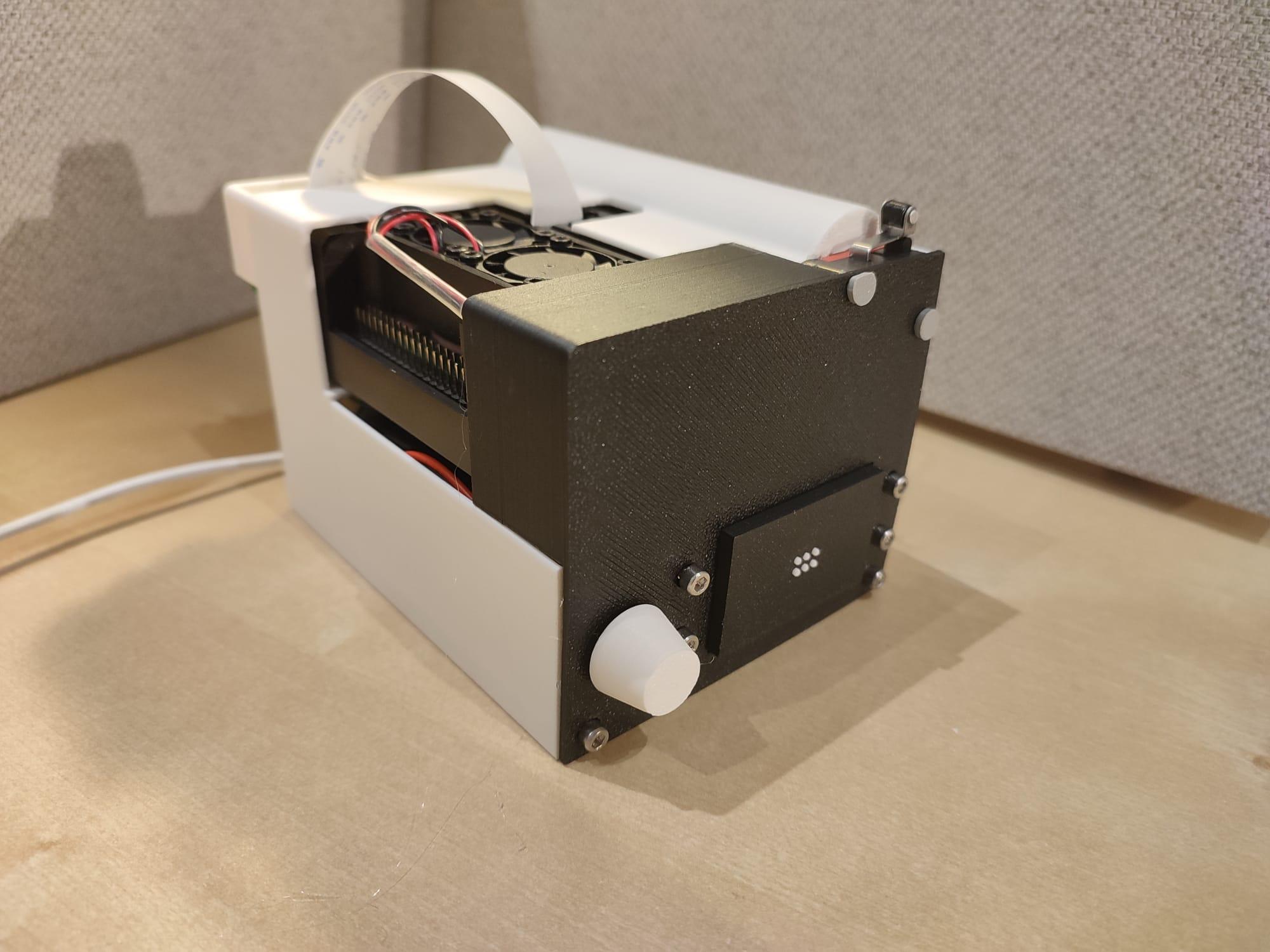
That is the idea behind Braille Vision, a portable text-to-Braille prototype developed by maker Joseph Chen and collaborators. The machine combines a Raspberry Pi, a camera, Tesseract optical character recognition, an Arduino Uno, and six miniature solenoids inside a 3D-printed enclosure. Its silhouette resembles an old Polaroid camera, although instead of freezing a birthday party in slightly overexposed glory, it attempts to translate printed text into tactile information.
The project is not merely a novelty wearing a retro costume. It explores a practical question in assistive technology: How can blind and visually impaired users independently access printed words that were never provided in Braille?
A Portable OCR Machine With a Tactile Twist
Optical character recognition, usually shortened to OCR, converts photographs or scans of printed words into machine-readable text. OCR already powers document scanners, mobile translation apps, searchable PDFs, receipt processing tools, and accessibility software. Braille Vision adds a physical output stage to that familiar pipeline.
The user points the camera toward a sign, poster, package, or document and presses a microswitch that acts as the shutter. A headless Raspberry Pi 4 or Raspberry Pi 5 captures the image and sends it to the open-source Tesseract OCR engine. Once the software identifies recognizable characters, the machine translates them into patterns for a six-dot Braille cell.
An audible cue tells the user when processing has finished. A rotary control then advances through the captured text one character at a time. Each turn changes the arrangement of raised dots beneath the reader’s fingertip. After the final character, the sequence returns to the beginning.
It is part camera, part scanner, part mechanical display, and part exceptionally determined science-fair project. The design may not fit into a shirt pocket, but it makes the full text-to-touch process visible and understandable.
How Braille Vision Turns a Photograph Into Braille
1. The camera captures printed text
The process begins with a Raspberry Pi Camera Module. Unlike a flatbed scanner, the camera can be aimed at objects in the environment. That makes it better suited to “in the wild” situations where the text cannot be removed, flattened, or politely placed beneath a scanner lid.
A user might photograph a notice taped to a wall, the label on a storage container, a printed schedule, or a temporary sign at a train station. This flexibility is the project’s central appeal. The information does not have to arrive in an accessible digital file first.
However, the photograph must still be usable. OCR software loves crisp, evenly lit, straight-on text. It becomes less enthusiastic when presented with glare, shadows, tiny letters, severe angles, elaborate fonts, or backgrounds resembling an exploding bag of confetti.
2. Tesseract OCR recognizes the characters
After capture, the Raspberry Pi runs the image through Tesseract. The OCR engine analyzes shapes, groups them into lines and words, and produces digital text. Because Tesseract can operate locally, the prototype does not necessarily need to upload every captured image to a remote cloud service.
Local processing offers useful advantages for privacy and offline operation. A user could potentially scan mail, medical instructions, classroom handouts, or workplace notices without depending on a stable internet connection. The trade-off is that processing speed and recognition quality depend heavily on the Raspberry Pi, camera setup, image quality, and software configuration.
Preprocessing can improve results. Cropping away irrelevant scenery, correcting rotation, increasing contrast, reducing noise, sharpening characters, and converting the image to clean black text on a light background can make OCR much more reliable. In other words, the software occasionally needs someone to tidy the room before it can find the alphabet.
3. The Raspberry Pi sends text to an Arduino
Once OCR produces text, the system converts each character into the appropriate Braille-dot pattern. The Raspberry Pi handles the image processing and higher-level software, while an Arduino Uno controls the physical display.
This division of labor is sensible. The Raspberry Pi is powerful enough to run Linux, Python, camera software, and OCR. The Arduino is excellent at predictable, low-level control of electronic components. One computer reads the poster; the other makes six tiny metal parts perform synchronized fingertip choreography.
4. Six solenoids create a refreshable Braille cell
Standard literary Braille is built around cells containing six possible dots arranged in two columns of three. Different combinations represent letters, numbers, punctuation, and other symbols. Braille Vision recreates that arrangement using six compact solenoids.
A solenoid converts electrical energy into linear movement. In this project, each solenoid raises or lowers a pin corresponding to one Braille dot. MOSFETs act as electronic switches, allowing the Arduino to control the higher current required by the solenoids without attempting an electrical stunt it was never designed to survive.
The result is a single refreshable Braille cell. When the displayed character changes, the solenoids retract and extend to form a new pattern. Commercial refreshable Braille displays often provide an entire row of cells. This prototype presents one character at a time, reducing mechanical complexity and cost while creating a slower, more deliberate reading experience.
Why the Polaroid-Inspired Design Matters
The 3D-printed shell does more than keep loose wires from auditioning for a disaster documentary. It turns a collection of boards, switches, cables, and actuators into a recognizable handheld object.
The instant-camera comparison works because the interaction is familiar: aim, press a shutter, and receive a result. A conventional camera produces an image. Braille Vision produces a tactile interpretation of words found inside the image.
Physical controls may also be easier to locate than touchscreen buttons. The shutter, rotary dial, Braille pad, and audio feedback create distinct interaction points that can be identified by touch. Good assistive hardware should not require sight merely to activate its accessibility features, an unfortunate design joke that appears more often than it should.
The enclosure also demonstrates the importance of rapid prototyping. A maker can alter the grip, relocate the Braille cell, enlarge the controls, protect the camera, or redesign the internal mounts without commissioning expensive tooling. The same project can evolve through repeated 3D prints based on user feedback.
Why Output Braille Instead of Only Reading Text Aloud?
Text-to-speech is extremely valuable, and many modern phones can already photograph text and read it aloud. That does not make Braille redundant. Speech and Braille serve overlapping but different purposes.
Braille allows a reader to examine spelling, punctuation, capitalization, numbers, and formatting more precisely. It can be useful in classrooms, professional settings, programming, language study, and any task where the exact structure of the text matters. Listening to a synthetic voice say a password, serial number, chemical formula, or unfamiliar name can become a small adventure in auditory guesswork.
Tactile output is also important for people who are deafblind or who cannot comfortably rely on audio. It offers privacy in public spaces and does not require headphones. A person checking a letter, account number, or private note may prefer not to have the device announce the content to everyone within coffee-shop range.
Audio and Braille should therefore be viewed as complementary options. A future version of the machine could use speech for rapid skimming and Braille for detailed reading. Users could choose the output that best matches the situation rather than being told that one accessibility method has apparently won a cage match against the other.
Where a Portable Text-to-Braille Device Could Help
The most compelling applications are ordinary moments in which printed information appears without an accessible alternative.
- Public notices: Temporary warnings, building announcements, office closures, and event instructions are frequently printed and taped to a wall.
- Product packaging: A portable scanner could help identify food labels, storage instructions, household products, and nonprescription items.
- Education: Students could access classroom handouts, bulletin boards, worksheets, or printed excerpts that were not prepared in Braille.
- Travel: The device could assist with schedules, room information, ticket instructions, exhibit labels, and local notices.
- Workplaces: Printed memos, labels, meeting-room signs, and equipment instructions could become more independently accessible.
- Personal mail: Local OCR could provide a private way to inspect envelopes, letters, bills, and printed forms.
The machine would not eliminate the responsibility of organizations to provide accessible information. Accessibility should be built into documents, signs, websites, services, and public spaces from the start. Still, a personal conversion tool can help when the world neglects to complete its homework.
The Prototype’s Most Important Limitations
Braille Vision is an inventive prototype, not a finished commercial product. Its limitations reveal where future development would matter most.
OCR errors can become tactile misinformation
An incorrect OCR result does not magically become correct when displayed in Braille. A blurred “8” may be interpreted as a “3,” or decorative lettering may become nonsense. Errors are especially serious when reading medication instructions, financial details, addresses, or safety warnings.
A production device would benefit from confidence scoring, error alerts, repeated capture options, spelling checks, and perhaps audio confirmation. It could warn users when text quality is poor instead of delivering questionable results with the confidence of a GPS directing someone into a lake.
Camera alignment remains challenging
A sighted user can look at a preview and adjust the framing. A blind user needs nonvisual guidance. Future versions could provide spoken or haptic instructions such as “move left,” “tilt upward,” “text too small,” or “hold steady.” Automatic text detection could trigger capture when the page is centered and readable.
One character at a time is slow
The single-cell display keeps the mechanism approachable, but reading long passages character by character would require patience. Adding multiple Braille cells could improve speed and provide whole words or short phrases. Unfortunately, every extra cell adds six more moving pins, drivers, wires, power demands, and opportunities for a solenoid to develop an artistic temperament.
Uncontracted and contracted Braille require careful handling
Directly mapping letters to six-dot patterns can provide basic uncontracted Braille, but fluent Braille reading may involve contractions, contextual rules, capitalization indicators, number signs, and punctuation. Robust translation requires more than replacing every printed character with a simple symbol lookup.
Battery life, weight, heat, and noise matter
A Raspberry Pi, camera, Arduino, and multiple solenoids can consume substantial power. Solenoids may also produce heat and audible clicking. A practical portable model would need efficient actuators, durable batteries, safe thermal management, and a design comfortable enough to hold for repeated scanning.
What the Project Teaches About Accessible Engineering
Braille Vision demonstrates how widely available maker hardware can be combined into meaningful assistive technology. Raspberry Pi boards provide affordable computing, Arduino boards simplify physical control, Tesseract supplies mature OCR capabilities, and 3D printing makes customized enclosures possible.
The project is also educationally valuable because each stage can be studied separately. Builders can learn camera capture, image processing, Braille encoding, serial communication, transistor switching, inductive-load protection, mechanical design, and accessible user interfaces through one integrated system.
Its greatest value, however, may come from the questions it raises. Can the controls be identified reliably by touch? Is the camera easy to aim without vision? How quickly can experienced Braille readers understand the changing cell? What happens when OCR confidence is low? Can the device survive a backpack, a crowded bus, or an accidental encounter with a kitchen counter?
Those questions should be answered with blind and deafblind users involved throughout development. Assistive technology becomes genuinely useful when the people who will rely on it help define the problem, test the interface, identify frustrations, and reject features that looked brilliant only on an engineer’s whiteboard.
A Scenario-Based Experience: Using OCR-to-Braille in Everyday Life
Consider arriving at a community center where a paper sign has been attached to the entrance. The building is unexpectedly using another door, but the notice contains no Braille and no digital tag. A portable OCR-to-Braille machine could be aimed toward the page. After the shutter is pressed, the device processes the image and signals that the text is ready.
The first challenge would be framing. Without guidance, the camera might capture only half the sign or include too much background. Spoken alignment prompts or vibration patterns would immediately make the experience more dependable. Once captured, a short message such as “Entrance on Oak Street” would be manageable on a one-cell display. A long paragraph explaining construction permits, parking restrictions, and the director’s weekend plans would be considerably less charming.
Now picture using the device in a grocery store. A shopper wants to distinguish two similarly shaped boxes. The machine photographs the front label and identifies the product name. In this setting, Braille provides privacy and precision, while a speech option might deliver faster confirmation. The most satisfying experience would allow the user to switch between both modes: audio for the overall label and tactile output for exact numbers, ingredients, or spelling.
A classroom presents another realistic test. A teacher distributes a newly printed worksheet that was not converted into an accessible format. The student scans the heading and first question. The device offers immediate access, but the single Braille cell makes a full worksheet impractical. The experience reveals both the prototype’s promise and the continued need for properly prepared digital or embossed materials. Personal technology can bridge a gap; it should not become an excuse for institutions to leave the gap in place.
Outdoor use would expose additional problems. Sunlight could create glare, wind could make a paper notice move, and a glossy poster might reflect the camera operator more clearly than the words. Low-light environments would introduce blur and noise. A built-in light, autofocus assistance, rapid burst capture, and automatic selection of the clearest frame could reduce these frustrations.
The tactile interface itself would shape the emotional experience. A clearly located Braille pad and rotary knob could feel reassuring because the interaction is physical and predictable. Each click would advance the text at the reader’s chosen pace. Poorly spaced dots, excessive actuator noise, slow refreshes, or hot components would quickly turn that reassurance into fatigue.
The device would be most rewarding with short, high-value pieces of text: a room number, product name, directional sign, appointment time, warning, or short notice. These are precisely the fragments of information that can determine whether someone moves independently or must ask a stranger for assistance.
That sense of independence is the project’s real attraction. The machine does not need to read an entire novel to be useful. Sometimes accessibility means privately confirming three words on a door without waiting for another person to become available. A small tactile answer, delivered at the right moment, can have an outsized effect.
Conclusion: A Camera That Develops Accessibility
Braille Vision turns a familiar maker-tool combination into a thoughtful accessibility experiment. A Raspberry Pi captures and recognizes printed words, an Arduino controls six solenoids, and a refreshable Braille cell converts digital characters into touch. The Polaroid-like body gives the interaction a wonderfully simple rhythm: point, click, process, and read.
The prototype still faces substantial challenges involving OCR accuracy, camera alignment, translation rules, reading speed, power consumption, and durability. Yet it demonstrates a powerful direction for portable assistive technology. Printed text is everywhere, while accessible versions are not. A device that can bridge that divide locally and on demand could support greater privacy, literacy, and independence.
Note: Braille Vision is a maker prototype rather than a certified commercial reading aid. Safety-critical, medical, financial, or legal text should be verified through an additional accessible source whenever OCR accuracy is uncertain.

