
Beauty Unlocked
How to Change Your TikTok Username: Easy Step-by-Step Guide
Jun
If your current TikTok username feels like it was created at 2:13 a.m. by a sleep-deprived raccoon with Wi-Fi, you are not alone. Plenty of people join TikTok, pick a name in a hurry, and later realize it no longer matches their content, personality, business, or evolved sense of internet dignity. The good news is that changing your TikTok username is simple. The slightly less fun news is that TikTok has a few rules, and yes, one of them involves waiting.
This guide breaks down exactly how to change your TikTok username, what happens after you do it, why TikTok might not let you make the switch right away, and how to choose a better handle without accidentally creating a name that looks like a robot sneezed on your keyboard. Whether you are rebranding, cleaning up an old profile, or finally retiring a username that sounded clever in 2022, this article will help you do it the smart way.
What Is a TikTok Username, Exactly?
Your TikTok username is the unique handle attached to your account. It appears on your profile, shows up in your profile link, and helps other people search for or tag you. It is different from your display name, which is the name people see at the top of your profile.
Think of it this way:
- Username: Your unique account ID, usually shown with an @.
- Display name: The more flexible profile name people see first.
That difference matters. Your username affects your TikTok profile URL and your overall brand identity, while your display name gives you more room to be creative, descriptive, or mildly dramatic.
How to Change Your TikTok Username
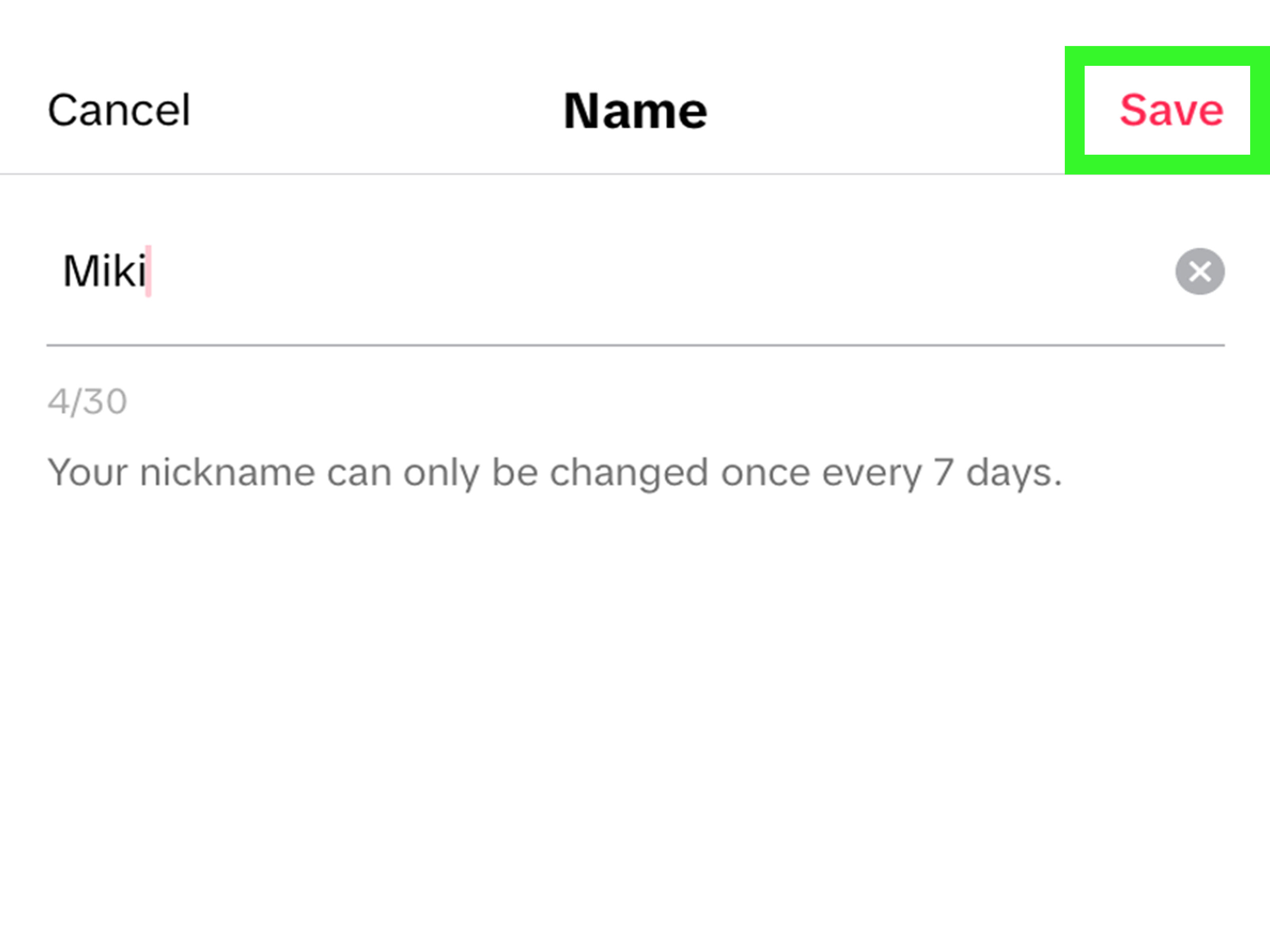
If you are here for the quick answer, here it is: open TikTok, go to your profile, tap Edit profile, tap Username, enter your new username, and save it.
Step-by-Step Instructions
- Open the TikTok app.
- Tap Profile at the bottom of the screen.
- Tap Edit profile.
- Tap Username.
- Delete your old username or edit it.
- Type your new username.
- Check whether it is available.
- Tap Save.
That is it. No secret maze. No hidden menu. No boss battle. Just a few taps.
What Happens After You Change Your TikTok Username?
Once your new TikTok username is saved, the change goes live immediately. Your profile will now display the updated handle, and your profile link will update too.
That last part is important. If you previously shared your TikTok profile on Instagram, YouTube, your website, a Link-in-Bio page, or old blog posts, those older links may no longer point to your active profile. So before you celebrate your shiny new username, take a minute to update your links everywhere else.
For creators and small businesses, this is a big deal. A username change can be great for branding, but it can also create a trail of broken breadcrumbs across the internet if you forget to update your profiles.
TikTok Username Rules You Should Know Before Changing It
TikTok does not let you freestyle without limits. Before you try to claim your new name, keep these platform rules in mind:
- Your username must be unique.
- You can only use letters, numbers, underscores, and periods.
- You cannot end the username with a period.
- You can only change your TikTok username once every 30 days.
That 30-day rule is the one that surprises most people. So do not rush into changing your handle from @EmmaCooks to @EmmaCooksOfficialRealFinalVersion unless you are absolutely sure. TikTok is not known for handing out unlimited do-overs.
Username vs. Display Name: Which One Should You Change?
Sometimes people want a fresh look but do not actually need a new username. In that case, changing your display name may be the better move.
Change Your Username If:
- You are rebranding your account.
- Your old handle is hard to spell or remember.
- Your current username no longer matches your niche.
- You want more consistency with your other social media accounts.
Change Your Display Name If:
- You want to add keywords or describe what you do.
- You want to change how your profile looks without changing your URL.
- You are testing a new content direction.
- You just want your profile to feel cleaner and more current.
This is where strategy matters. If your current TikTok username already has recognition, you may want to keep it and simply polish your display name. That gives you a refresh without losing link continuity.
Why TikTok Won’t Let You Change Your Username
If TikTok will not save your new username, one of these issues is probably the culprit:
1. You Changed It Too Recently
TikTok only allows one username change every 30 days. If you just updated it last week, the app is basically saying, “Nice try. Come back later.”
2. The Username Is Already Taken
If another account is already using the handle, you cannot claim it. Even if that username looks abandoned, TikTok still treats it as occupied unless the platform frees it under its own policies.
3. Your Username Breaks TikTok’s Formatting Rules
Special characters, spaces, or a period at the end can trigger an error. Keep it simple and platform-friendly.
4. There May Be a Temporary Profile Restriction
If you are having profile editing issues, TikTok’s account status tools may help you figure out whether your account has a restriction related to profile editing.
5. App Glitch or Version Problem
Sometimes the issue is less dramatic and more technical. Try updating the app, closing and reopening it, or logging out and back in.
How to Pick a Better TikTok Username
This is the part where many people accidentally create something unsearchable, forgettable, or impossible to say out loud. A strong TikTok username should be easy to remember, easy to type, and closely tied to your identity or content.
Smart TikTok Username Tips
- Keep it short. Long usernames are harder to remember and easier to mistype.
- Make it readable. If it looks like a Wi-Fi password, start over.
- Stay brand-consistent. Use a handle that matches your Instagram, YouTube, or website if possible.
- Avoid random numbers. Unless the number means something important, it can make your username feel generic.
- Use keywords naturally. If you are a creator, coach, cook, or shop owner, a relevant word can help clarify who you are.
- Think long-term. Choose a name you can live with as your content evolves.
Examples of Better Username Choices
Let’s say your name is Maya and you post home organization content.
- Weak: @maya482917
- Better: @MayaOrganizes
- Better for brand consistency: @OrganizedByMaya
- Simple and memorable: @MayaDeclutters
The goal is not to sound fancy. The goal is to sound like someone people can actually find again tomorrow.
Best Practices Before You Tap Save
Before changing your TikTok username, do a quick reality check:
- Search the username on other major social platforms.
- See whether the matching domain name or brand name matters to you.
- Ask whether the new handle still fits if your niche expands.
- Update your bio, profile image, and linked accounts if needed.
- Make a list of places where your old TikTok URL appears.
That extra five minutes can save you from a full afternoon of digital cleanup later.
What If You Want to Change Your Display Name Instead?
If your goal is to refresh your profile without changing your @handle, you can update your display name through the same Edit profile area. On TikTok, this field is usually labeled Name.
This can be helpful if you want to:
- Add your full name
- Include your niche, such as “fitness coach” or “budget cook”
- Use a seasonal or campaign-based profile label
- Test a brand phrase without touching your username
For many creators, the best setup is a stable username paired with a flexible display name. That gives you recognition and room to adapt.
Common Mistakes People Make When Changing a TikTok Username
They Change It Too Often in Their Head
Because TikTok only allows a username change every 30 days, indecision becomes expensive fast. Be thoughtful before you commit.
They Forget the Link Changes Too
This is one of the biggest practical mistakes. If your audience clicks an old profile link and lands nowhere useful, that is not exactly a growth strategy.
They Prioritize Cleverness Over Clarity
A witty username is fun. A clear username is useful. If you have to explain how to spell it every time, it is probably not working hard enough for you.
They Ignore Cross-Platform Consistency
Using the same or similar username across platforms helps people recognize you faster. That matters for creators, businesses, and even casual users who want a cleaner online identity.
Quick FAQ
How often can you change your TikTok username?
You can change it once every 30 days.
Can two TikTok users have the same username?
No. Usernames must be unique.
Does changing your TikTok username affect your old links?
Yes. Your profile URL changes, so old links may stop working correctly.
Can you use spaces or special symbols in a TikTok username?
No. TikTok limits usernames to letters, numbers, underscores, and periods, with some formatting restrictions.
Can you change your display name more often?
Yes. Your display name is separate from your username and follows different rules.
Real-World Experiences: What It’s Actually Like to Change Your TikTok Username
In real life, changing a TikTok username is less about tapping buttons and more about managing the ripple effect. A casual user might change a handle because their old name feels embarrassing. A creator may do it because their content niche changed from dance videos to skincare reviews. A small business might switch because the old username did not match the brand name customers were searching for. The technical process is quick. The branding decision is the real work.
One common experience is relief. A lot of users instantly feel better once the new username goes live because their profile finally looks polished and intentional. It can feel like cleaning a bedroom, changing a haircut, and updating a résumé all at once. Suddenly the account feels more “you,” and that can boost confidence when posting new content.
Another common experience is regret caused by speed. Some people rush into a trendy or overly specific username, only to realize it boxes them in. For example, a creator who starts with budget meal ideas might choose something like @DollarDinnerDana, then later wants to post travel or lifestyle content too. The name that once felt smart now feels like a tiny digital apartment with no closet space. That is why it helps to choose a username that gives you room to grow.
Businesses and side hustlers often notice the practical side right away. After changing a TikTok username, they have to update Instagram bios, website footers, newsletters, Linktree-style pages, business cards, and sometimes even packaging. It is not glamorous, but it is necessary. The best experience usually comes when the username change is part of a wider branding cleanup instead of a random late-night impulse.
People also tend to discover that clarity wins. The usernames that perform best socially are often not the most clever ones. They are the ones people can remember, type, and recognize without effort. That means short, readable, brand-aligned names tend to feel better over time than overly complicated ones packed with dots, underscores, and mystery numbers.
There is also a surprisingly emotional side to changing a TikTok username. For some users, it marks a fresh start. Maybe they are moving on from old content, rebuilding after a break, or trying to take their online presence more seriously. In that sense, a new username can act like a reset button. Not magical, of course. TikTok still expects you to post good content and not rely on vibes alone. But psychologically, a better profile can make it easier to show up consistently.
Then there is the waiting-game experience. Because TikTok limits username changes to once every 30 days, users who make a rushed choice often get stuck staring at a handle they already dislike. That is why seasoned creators usually recommend testing the name first: say it out loud, imagine it in a profile link, check whether it matches your other accounts, and ask whether it will still make sense six months from now.
The most successful username changes usually share three things: the name is easy to remember, the profile looks more consistent afterward, and the user updates the rest of their online presence quickly. When all three happen, the experience feels smooth and intentional. When they do not, the change can create confusion instead of clarity.
So yes, changing your TikTok username is technically easy. But the best results come when you treat it like a small branding move, not just a random settings edit. Your handle may only be a few words long, but it does a lot of heavy lifting.
Final Thoughts
Changing your TikTok username is easy, but choosing the right one deserves a little thought. Your handle is part search tool, part brand label, and part first impression. A good one helps people find you, remember you, and trust that your profile is active and intentional.
If your current username feels outdated, messy, or disconnected from what you post now, go ahead and fix it. Just make sure the new one is available, readable, consistent with your other platforms, and worth living with for at least the next 30 days. Internet history has enough chaos already. Your username does not need to add to it.
Note: TikTok may test slightly different button labels or layouts across app versions, devices, and regions, but the profile-editing flow is generally the same.

