
Makeup
A More Conspicuous Computer Assistant
Jun
For years, the tech industry has tried to make computers disappear. Speakers became fabric-covered cylinders. Routers became polite white boxes. Voice assistants became hockey pucks that sit on a counter pretending they are not tiny microphones with opinions about your grocery list. The ideal modern gadget, apparently, is one you barely notice until it misunderstands “turn on the lights” as “play yacht rock.”
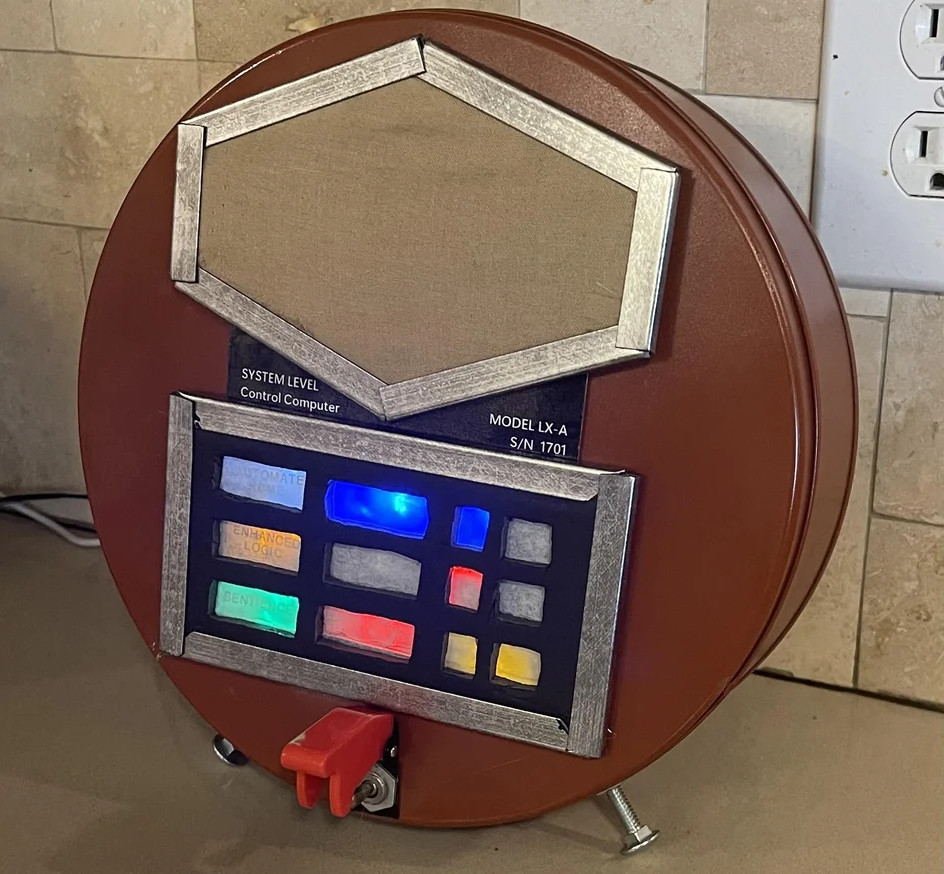
That is why the idea behind A More Conspicuous Computer Assistant feels so refreshing. Instead of hiding a smart assistant inside minimal plastic, a maker-style project transformed an Amazon Echo Pop into something that looks like it escaped from a 1960s science-fiction control room. Think glowing panels, retro “blinkenlights,” a chunky body, and the cheerful absurdity of a machine that wants you to know it is doing machine things.
But this project is more than a fun weekend build. It points to a bigger question in the age of AI assistants, voice interfaces, and screen-aware copilots: should our digital assistants be more visible? The answer is yeswhen visibility builds trust, improves usability, supports accessibility, and reminds us when the machine is listening, thinking, or acting. The answer is nowhen visibility becomes interruption, surveillance theater, or Clippy in a shiny new trench coat.
What Is a Conspicuous Computer Assistant?
A conspicuous computer assistant is a digital assistant that announces its presence through design. It may use lights, movement, sound, an avatar, a dedicated display, or physical controls to communicate status. Instead of whispering from inside a black cylinder, it behaves more like a visible appliance: “I am on,” “I heard you,” “I am processing,” “I am muted,” or “Please stop asking me to divide by zero; I have feelings, sort of.”
The retro Echo Pop project is a perfect example. The assistant itself remains largely the same: a compact Alexa-powered speaker. The transformation happens around it. The Echo is placed inside a larger handmade shell, supported by electronics that respond to sound from the speaker and trigger a set of lights. The result is a voice assistant with theatrical feedback. It looks less like a hidden service and more like a character in the room.
This matters because computers have lost many of their obvious signals. Old machines had fans, switches, lights, tape reels, and front panels. You could see that something was happening. Modern devices are smoother, quieter, and more powerful, but they often hide their state. A smart speaker might be connected, muted, recording, thinking, updating, or failing silentlyand the user may only get one tiny ring light as a clue. That is elegant until it becomes confusing.
The Charm of Blinkenlights
The word “blinkenlights” is old hacker slang for blinking diagnostic lights on computers and network equipment. In classic computing rooms, lights were not just decoration. They suggested activity, rhythm, and machine presence. Even when the lights were too fast for humans to interpret in detail, they made computation visible. They gave the machine a pulse.
That pulse is exactly what the retro assistant revives. It borrows from mid-century science fiction, where computers were not invisible clouds but big, glowing, humming objects with dramatic control panels. The old future was wonderfully physical. A computer had knobs. A spaceship had blinking consoles. A robot had a voice that sounded like a toaster reading Shakespeare.
In today’s homes, technology often tries to fade into the background. That can be useful. Nobody wants a smart thermostat that looks like it is preparing for launch at 3 a.m. But total invisibility has a downside. When a device is always present but visually quiet, people can forget what it is capable of doing. A more conspicuous assistant restores the social contract: this object is here, it has sensors, it responds to commands, and it deserves a clear place in the room.
Why Visibility Is Good UX, Not Just Decoration
Good user experience depends on feedback. When you press a button, send a request, or speak a command, the system should show that it understood something. This is one of the oldest and most durable principles of interface design: people need to know what the system is doing. If nothing changes, users wonder whether the machine is working, frozen, ignoring them, or quietly plotting to update firmware during dinner.
Visible computer assistants can solve this with simple signals. A blue light can mean listening. A red light can mean muted. A pulsing animation can mean processing. A small display can show the current task. A physical switch can make privacy feel real instead of buried three menus deep under “Settings,” “Advanced Settings,” and “Are You Really Sure?”
This is where a conspicuous design becomes practical. The retro Echo build is playful, but the design logic is serious. Lights that react when the assistant speaks make the device easier to understand from across a room. A physical mute or disable switch gives users control when background audio triggers the system. Diffused lighting improves the look and reduces harsh glare. Even the larger enclosure makes the assistant harder to ignore, which is useful when the device includes always-available voice features.
The Privacy Argument: Make Listening Obvious
Smart assistants live in a sensitive category. They are helpful because they can hear, see, remember, summarize, and act. They are worrying for the exact same reasons. A hidden assistant asks for trust. A visible assistant can help earn it.
Amazon Echo devices already use light indicators to show different states, including when Alexa is listening or when the microphone is disabled. The red microphone-off signal is a small but important design choice because it turns an invisible privacy state into something a person can check at a glance. Microsoft Copilot, Google Gemini, Apple Intelligence, and other modern AI systems face the same challenge in different forms: users need to understand when AI is active, what it can access, and whether it is merely answering or actually taking action.
The more powerful assistants become, the more important these signals become. A text chatbot that drafts a paragraph is one thing. An assistant that can view your screen, summarize your email, connect to your calendar, or perform tasks across apps is another. In that world, conspicuous design should not be optional flair. It should be part of responsible AI interaction.
From Alexa to Copilot: The Assistant Is Leaving the Box
The first wave of consumer voice assistants lived mostly inside speakers and phones. The next wave is spreading across operating systems, browsers, apps, cars, wearables, and workplace tools. Microsoft Copilot can be invoked by voice on Windows, and Copilot Vision is designed to analyze what appears on a screen or camera feed when the user activates it. Google Gemini is positioned as a personal AI assistant that can connect with apps and help break big goals into smaller steps. Apple Intelligence emphasizes integrated assistance across iPhone, iPad, and Mac, with privacy protections such as on-device processing and Private Cloud Compute for more complex requests.
That shift changes the design problem. A speaker assistant answers from one place. A computer assistant may follow you through documents, meetings, search results, photos, spreadsheets, and messages. It can be more useful, but also more ambiguous. Where is it? What does it know? Is it reading this screen? Did it just use my private data? Can it send that email by itself, or is it only suggesting text?
A more conspicuous assistant answers these questions through interface cues. It may use a persistent but calm status area, permission prompts written in plain English, visible activity logs, tool-use confirmations, or a dedicated “AI is active” indicator. The goal is not to cover the screen in glowing badges. The goal is to make the assistant’s role understandable before users have to worry about it.
The Clippy Lesson: Personality Without Pestering
No article about visible computer assistants can avoid the paperclip in the room. Microsoft’s Office Assistant, commonly remembered as Clippy, was one of the most famous attempts to make software help visible and personable. It also became a legendary cautionary tale. Clippy was cute, memorable, and often deeply annoying. It appeared at the wrong times, guessed user intent too aggressively, and turned assistance into interruption.
The lesson is not that assistants should never have personality. The lesson is that personality must serve usefulness. A charming assistant that interrupts work is still an interruption. A beautiful glowing console that flashes during every background noise is still a nuisance. A helpful AI avatar that never explains what it is doing is still a trust problem with eyebrows.
The best conspicuous assistants are polite. They are visible without being needy. They offer help when the user asks, when the context is clear, or when the benefit is obvious. They can be dismissed. They can be muted. They can be toned down. They remember that the user is trying to finish a task, not audition for a buddy-comedy reboot starring a spreadsheet.
Design Principles for a Better Visible Assistant
1. Show State Clearly
The assistant should make its state obvious: idle, listening, processing, speaking, muted, disconnected, or acting. Ambiguous lights may look cool, but they can confuse users. A visible assistant should prioritize meaning before mood lighting.
2. Give Users Physical and Digital Control
Physical controls are underrated. A real mute switch, camera shutter, or disable button gives instant confidence. Digital controls should be equally clear, with simple privacy settings, activity history, and permission management.
3. Match the Assistant’s Visibility to the Task
Not every task deserves a light show. A timer may need a simple indicator. A screen-reading AI assistant may need a stronger visual signal. A system taking action across apps should require explicit confirmation. The bigger the consequence, the clearer the feedback should be.
4. Make It Accessible
Visibility should not depend only on sight. Status changes should also be available through sound, text, haptics, screen-reader-friendly status messages, or other assistive technologies. An assistant that only communicates through color-coded lights excludes users who cannot see those colors or lights.
5. Keep the Personality Optional
Some users love animated assistants. Others want a quiet panel and a keyboard shortcut. Good design allows both. Personality should be adjustable, not mandatory. Nobody should have to negotiate with a cartoon face just to summarize a PDF.
Why Retro Design Works So Well
Retro design works because it makes technology emotionally legible. A cookie-tin Echo with 1960s lights is funny, but it also turns an abstract cloud service into a tangible object. It says, “This is the computer corner.” It gives the assistant a stage, a body, and a recognizable behavior.
That is why retro-futuristic projects remain popular among makers. They combine nostalgia with function. They remind us that devices do not have to be sterile slabs. They can be expressive. They can belong to a room. They can make people smile before they ask for the weather.
There is also a gentle rebellion in the design. Modern tech often hides complexity behind smooth surfaces and subscription prompts. Retro builds expose the fantasy. They say the machine is not magic; it is electronics, sensors, code, lights, wires, and a human imagination with access to spray paint. That honesty makes the assistant feel less mysterious and more approachable.
Practical Uses for a More Conspicuous Assistant
A visible assistant can be useful in homes, offices, classrooms, workshops, and accessibility-focused spaces. In a kitchen, a clear light state helps users know whether a timer or recipe command was heard over running water. In a workshop, a larger visual indicator can confirm voice commands when hands are busy. In an office, a display can show whether a meeting assistant is transcribing, summarizing, or inactive. In a classroom, a visible AI helper can make its role transparent so students know when it is providing hints versus answers.
The same concept applies to workplace AI. An assistant embedded in documents should show when it is using company files. A meeting assistant should clearly indicate recording or summarization. A browser assistant should identify whether it is reading only the current page or broader browsing context. Trust comes from boundaries, and boundaries need visible edges.
For makers, the project also offers a friendly template: start with an existing assistant, add a larger enclosure, connect audio-reactive lights, diffuse the glow, include a disable switch, and design the object so it feels intentional rather than like a router got trapped in a lunchbox. The best builds balance theatrics with usability. The lights should inform, not blind the cat.
The Future: Assistants With Presence, Not Ego
The future of computer assistants is not merely smarter answers. It is better presence. AI assistants will increasingly hear voice commands, see screens, understand context, connect to apps, and complete multi-step tasks. As they become more capable, they must become more accountable. A conspicuous interface can help by showing what the assistant is doing and where its authority begins and ends.
That does not mean every AI assistant needs a giant glowing cabinet. The right level of visibility depends on the device and environment. A phone may use a small animation and permission sheet. A desktop assistant may use a dedicated status panel. A home assistant may use lights and physical controls. A wearable may use haptics and voice confirmation. The principle stays the same: if the assistant can affect the user’s world, the user should be able to perceive, understand, and control it.
Related Experiences: Living With a More Visible Assistant
Imagine placing a conspicuous computer assistant on a desk instead of hiding it behind a monitor. The first difference is psychological. A normal smart speaker feels like background infrastructure. A visible assistant feels like equipment. It becomes part of the workspace, almost like a lamp, radio, or old laboratory instrument. That changes how people interact with it. They are more likely to treat it as a tool with limits rather than an invisible servant with mysterious powers.
In everyday use, the best experience comes from predictable feedback. When the assistant wakes, the lights should change immediately. When it is thinking, the pattern should slow or pulse. When it speaks, the lights can move with the voice. When muted, the device should look unmistakably off-duty. This small choreography makes interactions feel smoother because the user is never left wondering whether the command landed.
There is also a social benefit. In a shared room, a conspicuous assistant tells everyone what is happening. If a meeting assistant is recording, people should not have to guess. If a home assistant is listening, the visual cue should be readable from across the room. If the microphone is disabled, that should be equally obvious. A visible privacy state can prevent awkward moments, such as discussing a surprise birthday party while the assistant cheerfully adds “balloons” to the family shopping list.
For people who work with their hands, visible assistants can be genuinely helpful. A cook covered in flour, a hobbyist soldering parts, or a parent holding a baby cannot always tap a screen. Voice control helps, but only when feedback is clear. A bright but tasteful indicator lets the user know the assistant heard the command without requiring a second device. Add a physical cutoff switch, and the assistant becomes less like a suspicious gadget and more like a trustworthy shop tool.
The experience is not perfect. A conspicuous assistant can become distracting if the lights are too bright, too frequent, or too theatrical. Nobody wants a desk companion that flashes like a tiny nightclub every time an email arrives. The design must respect attention. Ideally, users can choose quiet mode, night mode, reduced motion, or full retro spaceship mode for those moments when productivity needs a little “Captain, the spreadsheet cannae take much more.”
What makes the idea memorable is not the hardware alone. It is the attitude. A more conspicuous computer assistant rejects the belief that good technology must always vanish. Sometimes good technology should be visible, honest, and even a little goofy. It should tell us when it is listening, show us when it is acting, and remind us that the future does not have to be a silent black box. It can blink politely from a cookie tin and still be useful.
Conclusion
A More Conspicuous Computer Assistant is not just a charming retro hack. It is a useful design argument. As AI assistants become more powerful, the interfaces around them must become clearer. Lights, displays, physical switches, accessible status messages, and well-timed feedback can turn invisible automation into understandable assistance.
The goal is not to bring back every bad habit of old computers. We do not need machines the size of refrigerators just to ask tomorrow’s weather. But we do need assistants that are visible when visibility matters. The best computer assistant of the future may be smart, private, accessible, and calmwith just enough blinkenlights to make the room feel like the future we were promised.

